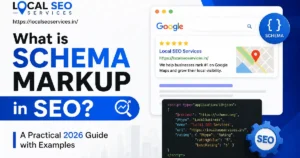
Schema markup in SEO is a piece of code, usually JSON-LD, that you add to a web page to describe its content in a format search engines can read. It labels things like the author, price, rating, or business address. Search engines use it to understand the page and to decide whether it qualifies for rich results such as star ratings or breadcrumbs.
Introduction
Most pages on the web look like meaning to a human and like soup to a machine. You see a price. A crawler sees a number in a div. You see a publish date. A crawler sees eight characters that could be a date, a version number, or a room rate.
Schema markup closes that gap. It is a small block of structured code that says, in effect, this number is a price in Indian rupees, this person is the author, this string is the opening time on Sundays.
This guide covers what schema markup in SEO actually does, what it never did (despite what a lot of blog posts claim), which types still earn anything in Google as of mid 2026, and how to implement it without breaking things. I have written it for people who will have to ship the code or brief someone who will, so there are real examples rather than vague encouragement.
One thing worth saying early, because it saves people a lot of wasted effort: schema markup is not a ranking factor. Google has said this repeatedly, and the 2025 and 2026 deprecations make the point even harder to argue with. What schema does is help machines interpret your page correctly, and make certain search features possible. That is worth real money on the right page types. It is worth close to nothing on the wrong ones.
Table of contents
- What schema markup is, in plain English
- How search engines actually read a page
- Schema markup vs structured data vs rich results
- Why schema markup still matters in 2026
- What Google removed between 2023 and 2026
- JSON-LD, microdata, and RDFa compared
- The schema types that still do something
- Anatomy of a JSON-LD block
- Entities, @id, and @graph
- Step by step guide to adding schema markup
- Schema for different types of sites
- Schema markup and AI search
- Testing, validating, and monitoring
- Common mistakes
- Best practices
- Expert tips
- Frequently asked questions
- Key takeaways
What schema markup is, in plain English
Schema markup is a shared vocabulary for describing things on the internet. It comes from Schema.org, a project Google, Microsoft, Yahoo, and Yandex started together in 2011 so they would stop inventing four different ways to say “this is a recipe”.
The vocabulary has types (Recipe, Product, Person, Local Business, and Event) and properties (name, author, price, addressLocality). You pick the type that matches your page, fill in the properties that apply, and publish it inside the HTML.
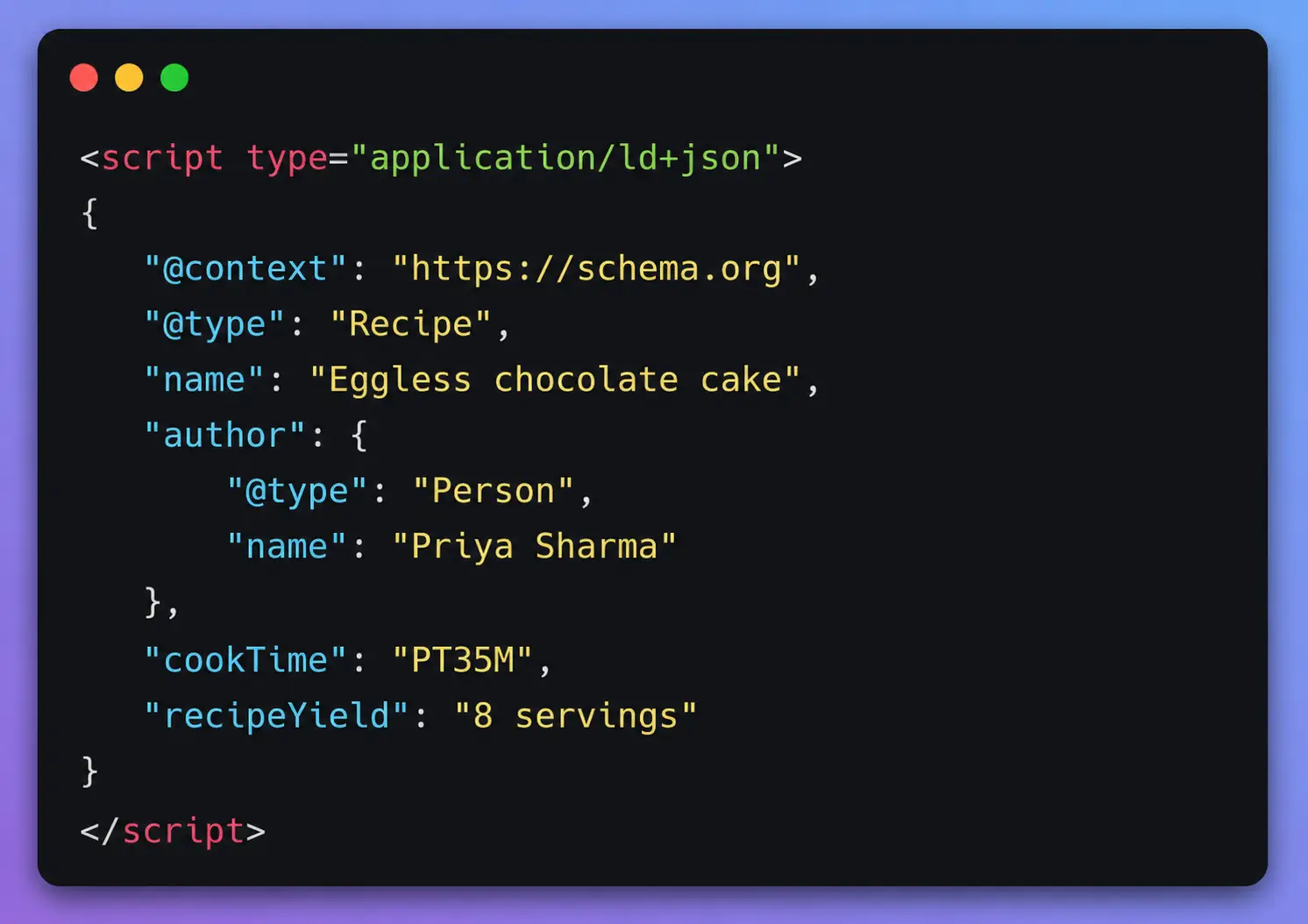
Here is the simplest useful example. A page about a chocolate cake recipe might contain this:
Nothing on the visible page changes. A visitor sees the same recipe. A crawler now knows the cook time is 35 minutes rather than guessing from a sentence.
That is the whole idea. Schema markup in SEO is translation, not decoration.
The three words people mix up
Schema.org is the vocabulary. JSON-LD is the format you write it in. Structured data is the general term for any of this. People use all three interchangeably, which is fine in conversation and confusing when you are reading documentation.
How search engines actually read a page
Understanding where schema fits requires knowing what happens before it. A search engine runs roughly four stages.
Crawling. A bot such as Googlebot requests your URL, following links and sitemaps to find it in the first place. If robots.txt blocks the path, or your CDN blocks the user agent, nothing after this matters.
Rendering and parsing. The HTML gets parsed and, for Google, usually rendered so JavaScript can run. This is the stage where a JSON-LD block gets picked up and turned into a set of facts about the page.
Indexing. Google works out what the page is about, which entities it mentions, whether it duplicates another URL, and stores it. Structured data feeds this stage. It does not replace the visible content, and if the two disagree, the visible content wins and your markup gets ignored or flagged.
Serving. For a given query, the engine picks results and decides how to display them. Schema affects display eligibility here: whether you can show a star rating, a breadcrumb path, a video thumbnail.
The practical takeaway is that schema helps at stages three and four. It cannot rescue a page that is blocked at stage one or thin at stage three. I have watched teams add markup to a site with a crawl budget problem and wonder why nothing happened. Fix the plumbing first.
Schema Markup vs Structured Data vs Rich Results
Understand the differences between the most common SEO schema terms.
| 📌 Term | 💡 What It Means | 💻 Example |
|---|---|---|
|
📊
Structured Data |
Machine-readable information that helps search engines understand the content on a webpage. |
JSON-LD Block XML Feed RSS Item |
|
🏷
Schema.org |
The vocabulary that defines types and properties used in structured data. |
Product Person FAQPage AggregateRating |
|
</>
Schema Markup |
Schema.org vocabulary that has been added to your webpage. |
<script type=”application/ld+json”> |
|
{ }
JSON-LD |
Google’s recommended syntax for implementing Schema Markup. |
“@type”: “Recipe” |
|
⭐
Rich Result |
Enhanced Google Search listings created from valid structured data. |
★★★★★ Ratings Price Breadcrumbs |
|
🔍
Rich Snippet |
An older SEO term that’s still commonly used for Rich Results. |
Still widely used by SEO professionals |
The distinction that matters commercially: you control the markup, Google controls the rich result. Correct markup makes you eligible. It does not entitle you to anything, and Google says so plainly in its documentation.
Why schema markup still matters in 2026
There are four reasons that survive scrutiny.
Rich results change how your listing looks, and appearance affects clicks. A recipe with an image and cook time occupies more space than a plain blue link next to it. You will find agency case studies claiming specific click-through-rate lifts, often around 20 to 40 percent. Treat those numbers as marketing rather than science: they are usually single site, uncontrolled, and published by someone selling schema services. The direction is real, the magnitude is not reliable.
Entity clarity is the quieter benefit. Marking up your organisation once, properly, with a consistent name, logo, and sameAs links to your verified profiles, helps Google connect your site to the right entity in its Knowledge Graph. This is dull work that pays off over years, particularly for brands with a common name.
Eligibility for specific features that have no other route in. Job postings, product merchant listings, video key moments, and event details all require markup. No schema, no feature. That is not a nice to have for an ecommerce or recruitment site.
Machine readability beyond Google. Bing parses it. Retrieval crawlers parse it. Your own internal search, your CRM enrichment, and any partner pulling your feed can all use the same block. If you built it well, it does more than one job.
What schema does not do: improve your position in the ten blue links. Nobody at Google has ever said otherwise, and I would be sceptical of anyone who tells you they have measured it cleanly.
📉 What Google Removed Between 2023 and 2026
Google gradually reduced support for several structured data features and Rich Results.
Understanding these updates helps you avoid outdated SEO advice.
| 📅 Date | 🚀 What Changed |
|---|---|
| August 2023 | HowTo Rich Results removed.
FAQ Rich Results restricted to well-known government and health websites. |
| June 12, 2025 | Google retired seven structured data features:
Book Actions, Course Info, Claim Review, Estimated Salary, Learning Video, Special Announcement, Vehicle Listing. |
| September 8, 2025 | Search Console reporting and Rich Results Test support removed for those seven structured data types. |
| January 2026 | PracticeProblem
support removed from Search Console and its API. |
| May 7, 2026 | FAQ Rich Results removed completely,
including for government and health websites. |
| June 2026 | FAQ search appearance,
Search Console report, and Rich Results Test support discontinued. |
| August 2026 | FAQ Rich Results support removed from the Search Console API. |
JSON-LD vs Microdata vs RDFa
Compare the three most common structured data implementation formats.
| 📄 Format | ⚙️ How It Works | ✅ Google Support | 🏆 Practical Verdict |
|---|---|---|---|
| JSON-LD | A standalone script block placed inside the HTML without modifying page elements. |
Recommended
|
✅ Use this (Google’s preferred format) |
| Microdata | Adds Schema attributes directly into existing HTML elements and tags. |
Supported
|
⚠️ Legacy and difficult to maintain |
| RDFa | Uses HTML attributes similar to Microdata, originally designed for the Semantic Web. |
Supported
|
📚 Rare outside publishing and academia |
📈 Schema Types That Still Matter
The structured data types that continue to provide real SEO value in Google Search.
| 🏷 Schema Type | 🎯 Best For | 🚀 SEO Benefits |
|---|---|---|
| Organization | Homepage and one canonical organization block. | Knowledge Panel support, logo, entity recognition. |
| BreadcrumbList | Every internal page. | Breadcrumb navigation in Google Search. |
| Article / BlogPosting / NewsArticle | Editorial and blog content. | Author, publisher and date signals. |
| Product + Offer | Ecommerce product pages. | Price, availability, reviews and merchant listings. |
| Review + AggregateRating | Products and services with genuine reviews. | Eligible for star ratings. |
| LocalBusiness | Local businesses and physical locations. | Address, phone, hours, map support. |
| VideoObject | Pages with embedded videos. | Video thumbnails, duration and key moments. |
| Event | Events, conferences and ticketing. | Date, venue and ticket information. |
| JobPosting | Career and hiring pages. | Google Jobs inclusion. |
| Recipe | Food blogs and recipe websites. | Cooking time, ratings, ingredients and images. |
| Dataset | Research and open data. | Dataset Search visibility. |
| ProfilePage / DiscussionForumPosting | Author profiles and forums. | Forum visibility and author recognition. |
Anatomy of a JSON-LD block
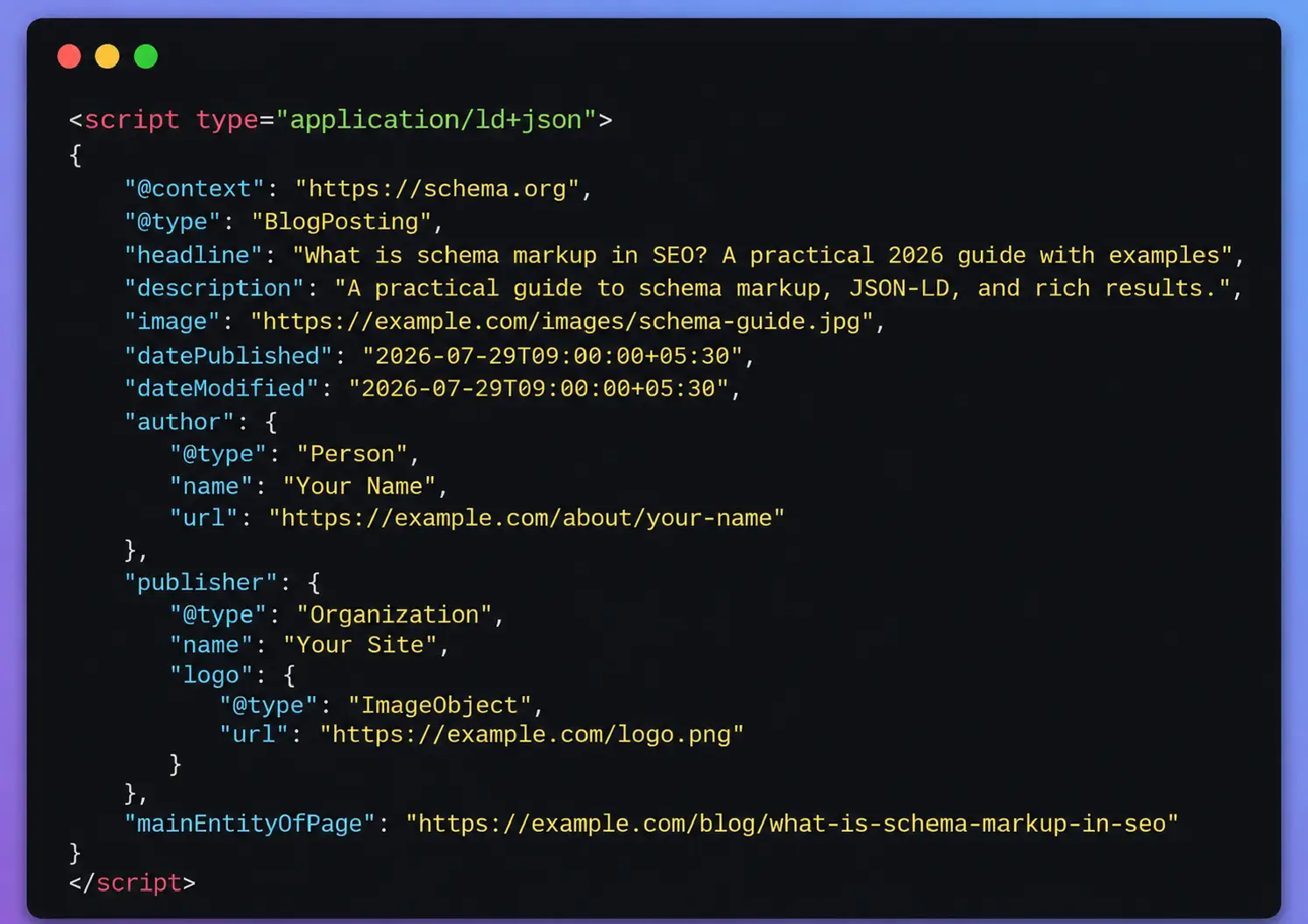
Here is an annotated Article block with the properties Google actually documents.
html
Two habits worth building. Check Google’s search gallery before you invest in any type, because that list has shrunk twice in eighteen months and will probably shrink again. And separate the question “is this valid Schema.org” from “does Google do anything with it”. FAQPage and HowTo are both perfectly valid and both currently produce zero SERP lift.
Reading it line by line:
@context points at the vocabulary. It is always the same. Copy it and move on.
@type is the single most important choice you make. BlogPosting is a subtype of Article, so you get Article’s properties plus its own. Picking a narrower accurate type beats picking a broad one.
headline should match the visible H1 or title. Google truncates long ones, so keep it under about 110 characters.
datePublished and dateModified need ISO 8601 format with a timezone offset. Half the broken markup I see is a date typed as 29/07/2026.
author should be an object with a URL pointing at a real author page, not a bare string. This is the difference between a name and an entity.
mainEntityOfPage tells the engine which URL this markup describes, which matters on paginated or syndicated content.
Entities, @id, and @graph
This is where competent schema work separates from plugin defaults, and almost no ranking article for this keyword covers it properly.
A page usually contains several related things: an organisation, a website, a web page, an article, an author. Instead of publishing five disconnected blocks, connect them with @id references inside a single @graph.
html
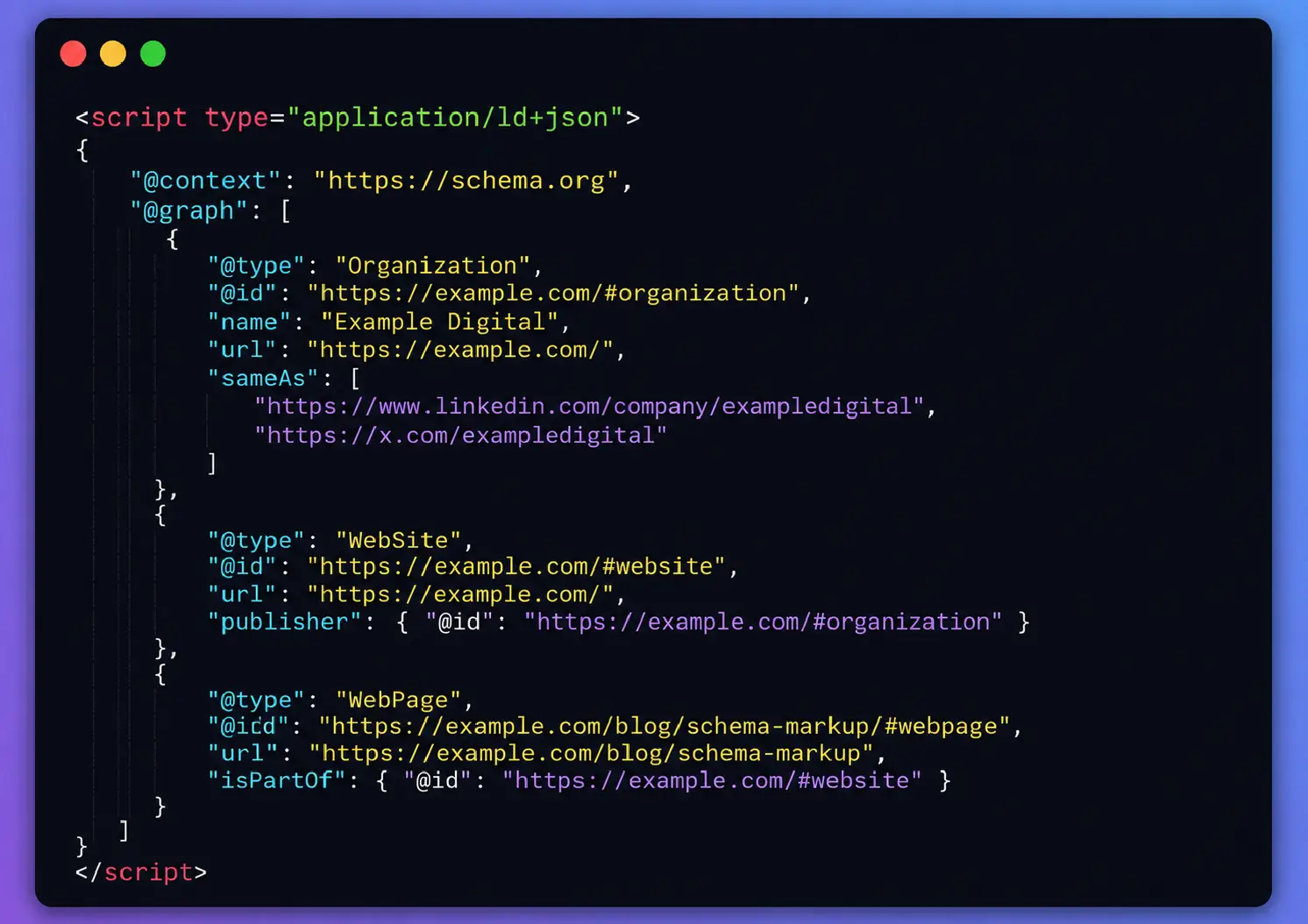
The @id values are just unique identifiers. The fragment convention (#organization) is a habit borrowed from Yoast and RankMath, and it works well because the IDs stay stable across the site.
sameAs is how you tell Google that this organisation and that LinkedIn company page are the same thing. Only list profiles you control and that clearly belong to the brand. Padding it with random directory listings does nothing useful.
The payoff for graph based markup is consistency. One organisation node, referenced everywhere, instead of forty slightly different versions of your company name scattered across templates.
Step by step guide to adding schema markup
- Pick one page template, not the whole site. Product pages, or blog posts, or location pages. Templates are where schema scales.
- Choose the narrowest accurate type. A dentist is a Dentist, which inherits from MedicalBusiness and LocalBusiness. Use Dentist.
- Read Google’s documentation for that type and list the required properties, then the recommended ones. Required gets you eligible. Recommended usually gets you a better result.
- Map each property to a real field in your CMS or database. If the value only exists in a designer’s head, it is not ready.
- Write the JSON-LD for one URL by hand. Do not template anything yet.
- Validate it in the Rich Results Test and the Schema Markup Validator. Fix every error, then decide which warnings are worth fixing.
- Templatise it. Escape quotes in dynamic strings, handle missing values by omitting the property rather than printing an empty string, and never output “null”.
- Deploy to a handful of URLs and run URL Inspection on the live version to confirm Google sees the rendered markup.
- Roll out to the full template.
- Watch the relevant Search Console enhancement report for two to four weeks. Errors that appear at scale usually come from edge case content, such as a product with no price or an article with no author.
Step seven is where most implementations break. A product title containing an apostrophe or a quotation mark will produce invalid JSON, and the failure is silent: no rich result, no obvious error on the page.
Schema for different types of sites
Ecommerce
Product plus Offer is the core. Include price, priceCurrency, availability, and a stable identifier such as GTIN or SKU. Keep availability accurate, because stale in stock markup on a sold out product is the fastest way to lose merchant eligibility. If you have variants, model them properly rather than publishing one blurry product node covering six sizes.
Review markup must come from genuine customer reviews on that page. Google has restricted self serving review markup on Organization and LocalBusiness since 2019, so a five star rating you gave your own company is both against the guidelines and pointless.
Local business
One LocalBusiness or appropriate subtype per physical location, on that location’s own page. Not on every page. Include address, geo coordinates, telephone, openingHoursSpecification, and the Google Business Profile URL in sameAs.
Consistency between your markup, your website footer, and your Google Business Profile matters more than the markup itself. If the phone number differs by one digit across those three, the markup is not going to save you.
Publishers and blogs
Article or BlogPosting, a real Person author with a real author page, accurate dates, and an Organization publisher. Author pages should carry ProfilePage or Person markup with credentials and sameAs links. This is one of the few places schema and E-E-A-T genuinely overlap: you are giving Google a machine readable way to connect a byline to a person with a track record.
SaaS and B2B
Organization on the homepage, BreadcrumbList across the site, Article on the blog, and SoftwareApplication if you have a genuine app listing. Most B2B sites over invest here. Your leads are not coming from rich results. They are coming from pages that answer buying questions, and your schema budget is better spent making sure your organisation entity is unambiguous.
Service businesses
Service and Offer nodes on service pages, plus LocalBusiness where you have a service area. Use areaServed honestly. Listing four hundred cities you have never worked in is a spam pattern, not a strategy.
Schema markup and AI search
Google published its first official guide to optimising for generative AI features on May 15, 2026. The relevant sentence for this topic is unambiguous: there is no special Schema.org structured data you need to add to appear in AI Overviews or AI Mode, and no AI specific file or markup either. AI Overviews and AI Mode draw on the same index and ranking systems as regular Search.
What the guidance does ask for is boring and familiar: allow crawling in robots.txt and at the CDN, keep important content in text rather than locked inside images or scripts, link internally so pages are findable, and make sure any structured data you do publish matches the visible text.
So how should you think about schema and AI search honestly?
Schema is a comprehension layer, not a citation lever. Clean markup makes it easier for any system to extract a price, a date, or an author. That is useful. It is not a documented ranking or citation input for any major AI system, and every vendor that claims otherwise is selling something.
The things that do seem to correlate with getting cited are unglamorous. Direct answers near the top of a section. Specific numbers and dates rather than vague claims. Clear headings that match how people ask the question. Content that could not be assembled by averaging everyone else’s page. Structured data supports that work. It does not substitute for it.
If you want one practical AI related action from this section: make sure your Organization node, author entities, and product data are accurate and consistent, because those are the facts a retrieval system will pick up and repeat about you. Wrong facts in your markup become wrong facts in someone’s answer.
🛠 Testing, Validating & Monitoring Schema
Use the right Google tools to validate structured data before and after deployment.
| 🧰 Tool | 🔍 What It Checks | ⏰ When To Use |
|---|---|---|
|
Rich Results Test
|
Checks whether Google-supported rich result features are detected and eligible. | Before publishing and after deploying structured data. |
|
Schema Markup Validator
|
Validates all Schema.org vocabulary, including types that Google doesn’t support. | When implementing Schema outside Google’s supported rich results. |
|
URL Inspection
|
Shows exactly what Google sees on the live rendered page. | After deployment or when schema unexpectedly stops working. |
|
Search Console Reports
|
Detects structured data errors, warnings and enhancement issues across your website. | Continuous monitoring and long-term maintenance. |
A note on those enhancement reports: the set has narrowed considerably. As of mid 2026 the actively reported types are a short list including breadcrumbs, product snippets, merchant listings, review snippets, and video. Absence of a report does not mean absence of support, and presence of a rich result is never guaranteed even when Search Console shows zero errors.
Errors versus warnings, in practice. An error means the required property is missing and you are not eligible. A warning means a recommended property is missing and your result may be less complete. Fix errors immediately. Fix warnings when the property is available and meaningful.
One habit that has saved me repeatedly: re run the Rich Results Test on the live URL after every theme update, plugin update, or template deploy. Markup breaks silently and nothing on the page looks different.
Common mistakes
Marking up content that is not visible on the page. Google requires the markup to reflect what a user can see. Hidden FAQ answers, invisible prices, and ratings that appear nowhere on screen are guideline violations, and in bad cases earn a manual action for structured data spam.
Two plugins publishing conflicting blocks. Your theme adds microdata, Yoast adds JSON-LD, and a third plugin adds an Article block with a different author. Google now has three answers to one question. Pick one source of truth and disable the rest.
Invented aggregate ratings. A 4.9 from 128 reviews that exist nowhere is the single most common structured data manual action I have seen. It is also trivially detectable.
Using Product on non product pages. A category page is not a Product. A blog post reviewing a laptop you do not sell is a Review, not a Product with an Offer.
Copy pasting a competitor’s JSON-LD. You will ship their URLs, their logo path, and their organisation ID. It happens more than you would think.
Publishing Organization schema on every page with slightly different values. One canonical organisation node, referenced by @id, is worth more than five hundred inconsistent ones.
Malformed dates and unescaped quotes. Both produce silently invalid JSON.
Injecting schema through Google Tag Manager because it is easier. Google can usually render it, but the markup then depends on JavaScript execution, adds a rendering dependency, and is invisible to crawlers that do not run scripts. Server rendered markup is more reliable. Use GTM for a quick test, not as the permanent home.
Chasing deprecated types. Adding HowTo markup in 2026 to win a rich result that has not existed since 2023 is pure wasted sprint time.
Forgetting to update the markup when the page changes. Prices, availability, and dateModified go stale faster than anything else on a site.
Assuming validation equals eligibility. Valid markup on a thin, low trust page produces exactly nothing.
Best practices
Match the markup to the visible page, always. If you would not show it to a user, do not mark it up.
Use JSON-LD, server rendered, one block or one @graph per page.
Start with the templates that have the most URLs and the clearest commercial value. A single correct product template across twelve thousand SKUs beats a hand crafted block on your about page.
Include required properties first, then add recommended ones where you have real data. Do not invent values to fill fields.
Connect nodes with @id instead of repeating entity details.
Keep one canonical Organization node with a consistent name, logo, and sameAs list.
Re validate after every deploy, and set a quarterly calendar reminder to check Google’s supported feature list against what you publish.
Document your schema strategy somewhere a developer will find it. The most fragile thing about structured data is that it lives in code nobody remembers adding.
Expert tips
Build a schema audit into your release process. A simple script that fetches ten representative URLs per template and validates the JSON-LD will catch breakage a week before Search Console does.
Log your markup output in staging. If your CMS produces the JSON dynamically, print it in a staging environment and read it as a human. Templating bugs are obvious on screen and invisible in production.
Treat your author entities as a long term asset. Real author pages with credentials, consistent naming, and sameAs links to professional profiles do more for perceived expertise than any snippet trick.
When a rich result disappears, check three things in order: is the page still indexed, does the markup still validate on the live URL, and did Google deprecate the feature. The third explanation has become surprisingly common.
Do not delete deprecated markup in a panic. Google has stated that unused structured data does not cause problems in Search. Remove it during your next planned template cleanup, not on a Friday afternoon.
Keep a one page internal record of which types you publish on which templates. When someone asks in six months why product pages lost their stars, that document is the fastest path to an answer.
Frequently asked questions
Is schema markup a ranking factor?
No. Google representatives have said consistently that structured data is not a ranking signal, and nothing in Google’s published documentation contradicts that. What schema does is help search engines understand your content correctly and make your page eligible for rich results. Those rich results can improve click-through rate, which affects traffic without changing your position. If someone promises rankings from schema alone, ask them for a controlled test. They will not have one.
Does schema markup help with AI Overviews and ChatGPT?
Not directly, based on what has been published. Google’s May 2026 generative AI guidance states there is no special Schema.org markup required for AI Overviews or AI Mode, and no AI specific file to create. No AI vendor has confirmed schema as a citation input. Accurate markup still helps machines extract facts about your business correctly, which matters if you care what those systems say about you. Treat any stronger claim as unproven.
Should I remove FAQ schema now that the rich result is gone?
There is no urgency. FAQPage remains a valid Schema.org type, Google says it will keep using the markup to understand pages, and unused structured data does not cause problems in Search. The one exception is reporting: FAQ data disappears from the Search Console API in August 2026, so update any dashboard or BigQuery export that queries it. Otherwise, clean it up during your next template revision if you want to reduce page weight.
What is the difference between schema markup and structured data?
Structured data is the general category: any standardised, machine readable information about a page. Schema markup is the specific implementation using the Schema.org vocabulary, which is what search engines have standardised on. In everyday SEO conversation the two terms get used interchangeably, and that is usually fine. The distinction matters mainly when you are reading documentation, where Google says structured data and means Schema.org markup in JSON-LD.
Which schema format should I use?
JSON-LD. Google recommends it, it lives in a self contained script tag, and it survives design changes because it is not woven into your HTML elements. Microdata and RDFa are still supported, but they attach markup to specific tags, which means a front end refactor can quietly destroy your structured data. If you inherited a microdata implementation, migrate it when you next touch that template rather than running both formats at once.
How long does it take to see results from schema markup?
Google has to recrawl and reprocess the page first, which typically takes days to a few weeks depending on how often it crawls your site. Rich results can appear quickly on frequently crawled pages and slowly on neglected ones. Two caveats: eligibility is not a guarantee, and Google may show a rich result for some queries and not others. If nothing has changed after a month, verify with URL Inspection that Google sees the markup on the live rendered page.
Can schema markup hurt my site?
Only if you misuse it. Marking up content that is not visible, publishing fake ratings, or using a type that misrepresents the page can trigger a manual action for structured data spam, which removes your rich results. Technically invalid markup does not carry a penalty, it just gets ignored. The realistic risks are wasted effort and silent breakage after a template change, both of which validation catches.
Do I need a plugin to add schema markup?
No, but plugins make sense for most WordPress sites. Yoast SEO and Rank Math both output a connected @graph automatically, which is better than most hand rolled implementations. The problems start when multiple plugins and a theme each publish their own markup. Pick one, disable the others, and validate the result. On custom builds, generating JSON-LD server side from your existing data model is usually cleaner than any plugin.
How much schema markup is too much?
There is no penalty for volume, but there is a maintenance cost. Marking up every entity you can think of produces code nobody maintains and values that go stale. A focused implementation covering your organisation, breadcrumbs, and your main content type usually captures most of the available benefit. Add specialised types when they unlock a feature you actually want, such as JobPosting or VideoObject.
Why is my rich result not showing even though the test passes?
Passing the Rich Results Test means you are eligible, not entitled. Google decides per query whether to show an enhanced listing, and it considers page quality and site level trust alongside the markup. Other common causes: the page is not indexed, the markup differs on the live rendered version, the feature was deprecated, or your site has a manual action. Check indexation and deprecation status before you rewrite any code.
What is @id used for in schema markup?
@id gives a node a unique, stable identifier so you can reference it elsewhere instead of repeating it. Define your organisation once with an ID like https://example.com/#organization, then point to that ID from your website, article, and product nodes. The benefit is consistency: one authoritative description of your company rather than dozens of slightly different copies. It also lets you build a connected graph, which makes the relationships between entities explicit.
Does schema markup work on Bing and other search engines?
Yes. Schema.org was a joint project between Google, Microsoft, Yahoo, and Yandex, and Bing parses the same markup for its own result enhancements. Support differs by engine and by type, so a feature Google dropped may still be used elsewhere. This is one reason not to delete deprecated markup in a hurry: Google’s supported list is not the whole internet, even if it is most of your traffic.
Should I add schema to every page on my site?
Add it where it describes something real. Every page can reasonably carry breadcrumbs and a WebPage node. Article markup belongs on articles, Product on products, LocalBusiness on location pages. Marking a contact form as an Article helps nobody and creates confusing signals. The test is simple: could a human read your markup and recognise the page from it.
How do I check what schema my competitors are using?
Open their page, view source, and search for application/ld+json, or paste the URL into the Schema Markup Validator, which shows every detected node. This is useful for spotting types you have overlooked in your industry. It is not useful as a copy target, since their markup describes their entities, their URLs, and sometimes their mistakes.
Is there any point in HowTo schema in 2026?
For Google Search, no. HowTo rich results were removed in 2023 and have not returned. The type is still valid Schema.org, so other consumers of your markup can read it, but you should not expect any visible benefit in Google. If your instructions are good, write them as clear numbered steps with real detail. That serves readers and any system summarising the page far better than markup for a feature that no longer exists.
Key takeaways
Schema markup in SEO is code that describes your page’s content in a vocabulary search engines understand, usually written as JSON-LD.
It is not a ranking factor. It affects understanding and eligibility for rich results, which affects clicks.
Google’s list of supported rich results has shrunk repeatedly since 2023, with FAQ rich results removed entirely on May 7, 2026. Check the current gallery before investing in any type.
FAQPage and HowTo remain valid Schema.org types with no Google SERP benefit. Leaving existing markup in place is fine.
Google’s own guidance says no special schema is required for AI Overviews or AI Mode. Accuracy still matters, because your markup shapes what machines repeat about you.
The highest value implementations are boring: one clean Organization node, breadcrumbs everywhere, accurate Article or Product markup on your main templates, and validation after every deploy.
Conclusion
The honest summary of what is schema markup in SEO is that it is useful plumbing. It will not lift a mediocre page above a better one, and the last three years of deprecations should end any argument on that point. What it will do is make sure the machines reading your site understand it the way you intended, and make you eligible for the search features that still exist.
Do the small version well before you do the big version at all. One correct organisation node, breadcrumbs across your templates, accurate markup on whichever page type earns your money, and a validation step in your release process. That covers most of the available upside.
Then spend the time you saved on the part schema was never going to fix, which is whether your page is worth reading.