If Google can’t find a page, that page can’t rank. It sounds obvious, but plenty of business websites have pages Google has never seen. A new service page sits three clicks deep. A blog post goes live and nobody links to it. A product only shows up through the site’s search box.
An XML sitemap is one of the simplest fixes for this. On most websites it takes about ten minutes to set up, and after that it mostly runs on its own.
This guide answers what is an XML sitemap in plain words. Then it covers what goes inside one, when it matters, how to create and submit it, and the mistakes we keep finding when we audit client websites.
What Is an XML Sitemap?
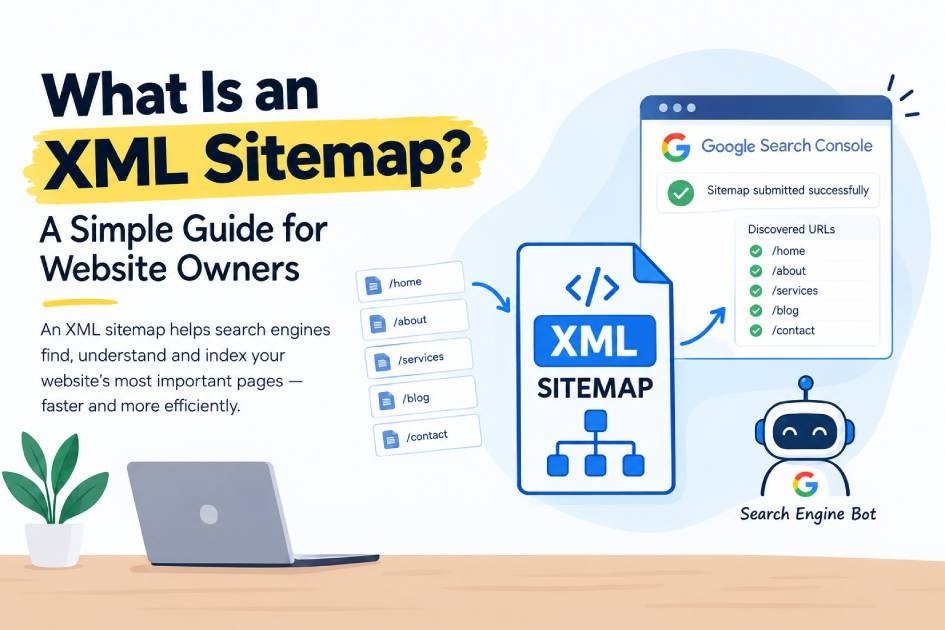
An XML sitemap is a file on your website that lists the URLs you want search engines to crawl and index. You can think of it as a note you hand to Google: these are the pages on my site that matter, and this is when each one last changed.
The file usually lives at an address like yoursite.com/sitemap.xml or yoursite.com/sitemap_index.xml. Your visitors never see it. It is written for crawlers such as Googlebot and Bingbot.
The format follows the Sitemaps protocol at sitemaps.org, a standard that Google, Yahoo and Microsoft agreed on in 2006. That shared standard is why a single file works for every major search engine.
So, the short answer to what is an XML sitemap: it’s a machine-readable list of the important pages on your website. If you want the bigger picture of how Google finds pages in the first place, read our guide on how search engines work.
How Search Engines Use Your XML Sitemap
Google doesn’t read your sitemap once and forget about it. It comes back to the file regularly.
- Googlebot fetches the sitemap from the URL you submitted or listed in robots.txt.
- It reads each URL along with its lastmod date.
- It adds new or recently changed URLs to its crawl queue.
- After crawling, it decides whether each page is worth indexing.
So a sitemap gets your pages into that queue. Indexing still depends on page quality. Next, here’s what the file itself contains.
What Does an XML Sitemap Look Like?
<?xml version="1.0" encoding="UTF-8"?>
<urlset xmlns="http://www.sitemaps.org/schemas/sitemap/0.9">
  <url>
    <loc>https://example.com/local-seo-services/</loc>
    <lastmod>2026-10-15</lastmod>
  </url>
  <url>
    <loc>https://example.com/blog/what-is-an-xml-sitemap/</loc>
    <lastmod>2026-10-21</lastmod>
  </url>
</urlset>
It looks technical, but there are only a handful of tags to know.
| Tag | Required? | What It Does | Does Google Use It? |
|---|---|---|---|
| <urlset> | Yes | Wraps the whole list | Yes |
| <url> | Yes | Holds one page entry | Yes |
| <loc> | Yes | The full page URL, including https:// | Yes |
| <lastmod> | No | Date the page content last changed | Yes, if accurate |
| <changefreq> | No | How often the page changes | No, Google ignores it |
| <priority> | No | Importance from 0.0 to 1.0 | No, Google ignores it |
That last column surprises a lot of site owners. Google has said publicly that it ignores priority and changefreq. It does read lastmod, but only when the dates match real changes. If your plugin stamps today’s date on every page every day, Google learns to distrust it.
Sitemap Index Files
One sitemap file can hold up to 50,000 URLs or 50 MB uncompressed, whichever comes first. Bigger sites split their URLs across several sitemaps and list them in a sitemap index file.
You’ve probably seen this on WordPress already. SEO plugins create one index that points to post-sitemap.xml, page-sitemap.xml, category-sitemap.xml and so on. Splitting by content type also makes problems easier to spot in Search Console.
Special Types of Sitemaps
The standard sitemap covers web pages. Google also supports a few extensions:
- Image sitemaps help Google find images it might miss, such as ones loaded by JavaScript.
- Video sitemaps add details like title, duration and thumbnail for video pages.
- News sitemaps are for publishers approved for Google News and only list articles from the last two days.
- hreflang entries tell Google which language or country version of a page to show, which is useful for multilingual sites.
How an XML Sitemap Helps Your SEO
A sitemap won’t push you up the rankings by itself. Google doesn’t reward a site for having one. What it does is make sure Google knows your pages exist, which has to happen before any page can rank.
Here is where it helps in practice:
- Faster discovery of new pages. Publish a new service page and Google can find it through the sitemap, even before other pages link to it.
- Coverage for deep or poorly linked pages. Pages buried several clicks from the homepage get crawled less often. The sitemap gives Google a direct path to them.
- Recrawling of updated content. An accurate lastmod date tells Google a page changed and is worth another visit.
- A canonical hint. Listing a URL in your sitemap is a weak signal that it’s the version you prefer Google to index.
- Better diagnostics. In Google Search Console you can filter the Pages report by sitemap. That shows you exactly which submitted pages are indexed and which aren’t, and why.
That last point is the one we use most in client audits. It turns a vague question (“why isn’t my site showing up?”) into a list of specific URLs and reasons.
Does Every Website Need an XML Sitemap?
Google’s own documentation says a small site of around 500 pages or fewer, with good internal linking, may not need one. Google can usually find everything by following links.
We still add one to every client site. It costs nothing, it can’t hurt, and it gives you that Search Console reporting. It matters most if your site:
- Is new and has few backlinks pointing to it yet
- Is large, with hundreds or thousands of pages
- Is an online store where products change often (see our e-commerce SEO services)
- Has weak internal linking or orphan pages that nothing links to
- Publishes a lot of images or video that matter for search
What to Include in Your XML Sitemap (and What to Leave Out)
Here’s the simple test we use: every URL in your sitemap should be a page you’d be happy to see in Google’s results. If you wouldn’t want it ranking, it doesn’t belong in the file.
Include these:
- Pages that return a 200 (OK) status
- The canonical version of each page
- Pages that are set to index (no noindex tag)
- Service pages, location pages, blog posts, product and category pages you want found
Leave these out:
- Pages with a noindex tag
- URLs that redirect (301 or 302). List the final destination instead.
- Broken URLs that return a 404 error. Our guide on what a 404 status code is explains how to find and fix them.
- Duplicate URLs, such as filter or tracking parameter versions
- Thin tag pages, author archives and media attachment pages
- Thank-you pages, login pages, cart and checkout pages
- Staging or test URLs
Sending Google mixed signals is a common problem. If your sitemap says “index this” and the page itself says noindex, you’re wasting crawl attention and cluttering your Search Console reports.
How to Create an XML Sitemap
Most platforms build the sitemap for you. You rarely need to write one by hand.
On WordPress
Since version 5.5, WordPress creates a basic sitemap at /wp-sitemap.xml. It works, but it gives you little control over what goes in.
Most sites are better off using an SEO plugin like Yoast SEO or Rank Math. Both create a sitemap index at /sitemap_index.xml and switch off the built-in WordPress one so you don’t end up with two.
- Install and activate Yoast SEO or Rank Math.
- Check that the sitemap feature is turned on in the plugin settings.
- Exclude content types you don’t want indexed, such as tags, media attachments and author archives.
- Open /sitemap_index.xml in your browser and confirm it loads.
On Shopify, Wix and Squarespace
These platforms generate a sitemap automatically at /sitemap.xml and keep it updated as you add pages or products. You can’t edit it much, so control what shows up by setting pages to hidden or noindex.
On a Custom-Built Website
Ask your developer to generate the sitemap dynamically from the database, so it updates every time content changes. Crawlers like Screaming Frog can also export a sitemap. Free online generators are fine for a small static site, but they go stale the moment you add a page.
How to Submit Your XML Sitemap to Google
Creating the sitemap is half the job. Next, tell search engines where it is.
- Sign in to Google Search Console and select your property.
- Go to Indexing > Sitemaps in the left menu.
- Enter your sitemap URL (for example, sitemap_index.xml) and click Submit.
- Wait for the status to show Success. Google will also show how many URLs it discovered.
Then add this line to your robots.txt file, so any crawler can find the sitemap:
Sitemap: https://yoursite.com/sitemap_index.xml
Submit the same URL in Bing Webmaster Tools too. Bing powers several other search tools, so it’s worth the two minutes.
One note: Google retired its old sitemap “ping” endpoint in 2023. Plugins that still ping Google on every update don’t speed anything up. Accurate lastmod dates do that job now.
Common XML Sitemap Mistakes We Find in SEO Audits
These come up again and again when we review client websites. They’re sorted by how much damage they usually do.
| Mistake | Why It Hurts | How to Fix It | Priority |
|---|---|---|---|
| Sitemap blocked in robots.txt or returning an error | Google can’t read the file at all | Open the URL in a browser, check robots.txt, and fix the server error | High |
| Noindex, redirected, or 404 URLs listed | Mixed signals and wasted crawling | Remove them and list only final, indexable URLs | High |
| Sitemap never submitted to Search Console | You lose the indexing reports | Submit it under Indexing > Sitemaps | High |
| Two sitemaps competing, such as WordPress core plus a plugin, or an old sitemap still submitted | Duplicate or outdated URLs get sent to Google | Keep one sitemap index and remove old submissions | Medium |
| http:// or non-www URLs when the site uses https://www | Google sees URLs that redirect | Match the exact version of your live URLs | Medium |
| lastmod set to today on every page | Google may distrust inaccurate modification dates | Only update lastmod when content really changes | Medium |
| Tag, attachment, and archive pages included | Thin pages can clutter the sitemap | Exclude unnecessary URLs in your SEO plugin settings | Low |
How to Check Your XML Sitemap Is Working
Run through this quick checklist once a month, or after any big site change:
- Open your sitemap URL in a browser and confirm it loads without errors.
- In Search Console, check that the sitemap status says Success.
- Compare the number of discovered URLs with the number of pages you expect.
- Open the Pages report, filter by your sitemap, and review why any URLs aren’t indexed.
- Use URL Inspection on two or three important pages to confirm they’re indexed.
A sitemap tells Google which pages exist. It doesn’t explain what those pages are about. For that, look at schema markup, and validate it with a structured data testing tool.
Final Thoughts on What Is an XML Sitemap
Now you know what is an XML sitemap and why it’s worth the few minutes it takes. Create one, keep it clean, submit it to Google and Bing, and check the Search Console report every month. It won’t win rankings on its own, but it makes sure Google sees the pages you’ve worked hard on.
Frequently Asked Questions About XML Sitemaps
What is an XML sitemap in simple words?
It’s a file that lists the important pages on your website so search engines can find and crawl them. Visitors don’t see it. Google, Bing and other search engines read it.
Does an XML sitemap improve Google rankings?
Not directly. It helps Google discover and recrawl your pages, and a page has to be indexed before it can rank. Rankings still depend on content, links and user experience.
Where can I find my website’s sitemap?
Try yoursite.com/sitemap.xml, /sitemap_index.xml or /wp-sitemap.xml. You can also check your robots.txt file, which often lists the sitemap location.
How often should I update my XML sitemap?
On WordPress, Shopify and most modern platforms, the sitemap updates itself whenever you publish or edit content. You don’t need to resubmit it to Google after every change.
How many URLs can one sitemap hold?
Up to 50,000 URLs or 50 MB uncompressed. Larger sites use a sitemap index file that links to several smaller sitemaps.