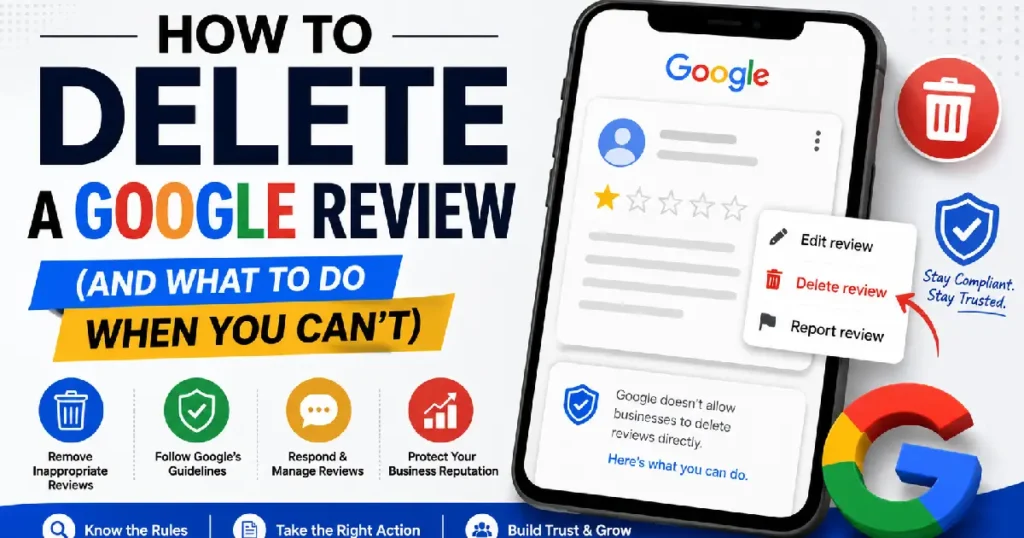
You can only delete a Google review if you wrote it yourself. Business owners cannot delete reviews left by customers — but they can flag reviews that violate Google’s policies and request removal. To delete your own review, open Google Maps, find your review under “Your contributions,” tap the three-dot menu next to it, and select “Delete review.”
Can You Actually Delete a Google Review?
If you wrote the review: yes. Delete it any time, no explanation needed.
If someone else wrote it: no. Not directly. Google doesn’t give business owners a delete button for customer reviews. You can flag a review and ask Google to remove it — but only if it actually breaks one of their content policies.
This surprises a lot of business owners. They figure it’s their listing, so they should have some control over what’s on it. Google disagrees, and deliberately so. Reviews are only worth anything to customers because businesses can’t quietly erase the bad ones.
That said, you’re not stuck. There are legitimate paths to getting a review removed, responding to it in a way that limits the damage, or drowning it out with better reviews. This article covers all of them, including which ones actually work.
How to Delete a Review You Wrote
If you left a review and want to take it back — maybe you left it in the wrong place, you changed your mind, or you accidentally posted before you finished writing — here’s how to remove it.
On Google Maps (Mobile)
- Open the Google Maps app on your phone.
- Tap your profile picture in the top right corner.
- Select “Your contributions” from the menu.
- Tap “Reviews” to see everything you’ve posted.
- Find the review you want to delete.
- Tap the three-dot menu (⋮) next to it.
- Select “Delete review” and confirm.
The review disappears immediately.
On Google Maps (Desktop)
- Go to maps.google.com and sign in.
- Click the menu icon (three horizontal lines) in the top left.
- Select “Your contributions.”
- Click the “Reviews” tab.
- Find the review, click the three-dot menu, and select “Delete review.”
Through Google Search
- Search for the business on Google.
- Scroll to your review in the reviews section.
- Click the three-dot menu next to your name.
- Select “Delete review.”
Note: You need to be signed into the same Google account you used to write the review. If you can’t find the review, check whether you’re logged into the right account.
Can You Edit Instead of Delete?
Yes. If you just want to change the wording or update the star rating, you can edit a review instead of deleting it. The process is identical — just choose “Edit review” instead of “Delete review” from the same menu.
How to Remove a Negative Review as a Business Owner
This is what most people searching this topic actually want to know.
You can’t force a review down. What you can do: flag it (if it breaks Google’s rules), respond to it publicly, or contact the reviewer directly if you know who they are.
Also Read: How to Rank on Google Maps in 2026: The Complete Guide
How to Flag a Review for Policy Violations
Flagging a review doesn’t guarantee removal. It sends the review to Google’s team for evaluation. If they agree it violates their policies, they’ll take it down. If they don’t, it stays.
How to Flag a Review on Google Maps
- Open Google Maps and find your business listing.
- Scroll to the review in question.
- Click or tap the three-dot menu (⋮) next to the review.
- Select “Report review.”
- Choose the reason that most accurately describes the violation.
- Submit.
How to Flag Through Google Business Profile
- Go to business.google.com and sign in.
- Click “Reviews” in the left sidebar.
- Find the review you want to flag.
- Click the three-dot menu and select “Report review.”
- Choose the violation type and submit.
How Long Does It Take?
Google doesn’t publish exact timelines. In practice, most owners report hearing back (or seeing a decision) within a few days to a few weeks. For reviews that are clearly fake or obviously spam, it’s usually faster. Borderline cases can drag on.
If your flag gets rejected and you still believe the review violates policy, you can escalate more on that below.
What Google’s Review Policies Actually Say
Understanding what Google prohibits is important — it determines whether your flag will go anywhere.
| Violation Type | What It Means |
|---|---|
| 🚫Spam & Fake Content | Reviews from accounts that don’t represent a real customer experience — including purchased reviews or bot-generated posts. |
| 📍Off-Topic Content | Reviews that aren’t about the actual business — for example, complaining about nearby parking that the business doesn’t own or control. |
| 🔞Restricted Content | Reviews containing illegal content, hate speech, explicit or graphic material, or anything that violates Google’s general content standards. |
| ⚠️Conflicts of Interest | Reviews written by current or former employees, business owners reviewing their own business, or competitors trying to harm your rating. |
| 🎭Impersonation | Reviews posted by fake accounts pretending to be real customers, or by someone misrepresenting their identity or affiliation. |
| ❌Misinformation | Demonstrably false factual claims about the business — not just a bad opinion, but statements that can be proven factually incorrect. |
| 👤 Personal Attacks | Content that targets individual staff members personally rather than reviewing the business experience, including harassment or threats. |
What’s notably not on this list: bad reviews. A one-star review that says “service was slow and the food was cold” is not a policy violation. It’s an opinion, and Google keeps it up.
The distinction matters because a lot of business owners flag reviews, hoping that “this review is unfair” or “this customer was difficult” will be enough. It isn’t.
When Google Will (and Won’t) Remove a Review
Google Typically Removes Reviews That
- Come from accounts with no other review history and were clearly created to harm one business (coordinated fake review attacks)
- Contain hate speech, slurs, or explicit content
- Are obviously posted by a competitor
- Include personal identifying information (addresses, phone numbers)
- Describe an experience at the wrong business (the reviewer clearly mixed up locations)
- Are left by someone who has a stated conflict of interest
- Promote a competing business
Google Typically Does Not Remove Reviews That:
- Are negative but describe an actual customer experience
- Use strong language, but don’t cross into hate speech
- Disagree with your version of events
- Come from a customer you had a dispute with
- Are anonymous (Google allows pseudonyms)
- Have a low rating without much explanation
One thing that frustrates business owners: Google doesn’t always communicate why a review was or wasn’t removed. You submit the flag, wait, and either the review disappears, or it doesn’t.
What to Do If Google Rejects Your Flag
If your initial flag was rejected, you have a few options.
Option 1: Escalate Through Google Business Profile Help
Go to the Google Business Profile Help Center and look for the option to contact support. You can request a human review of the decision. This works better when you have specific evidence — screenshots, records of the reviewer’s account being fake, proof they’re a competitor, etc.
Option 2: Use the “Street-Level” Escalation
Some business owners report success by posting in the Google Business Profile Community forum, where Google-certified product experts (called “Gold Product Experts”) can escalate flagged reviews directly to the Google team. It’s not a guarantee, but it’s a real option.
Option 3: Wait and Re-Flag
Google’s automated systems periodically re-evaluate reviews, especially if an account shows patterns of suspicious behavior across multiple businesses. A review that wasn’t removed today might be removed in three months when the account that posted it gets flagged by the system.
How to Respond to a Negative Review Instead
Most business owners underestimate this. How you respond to a bad review often matters more than the review itself.
When a potential customer reads a one-star review, they’re also reading your response. A calm, professional reply that acknowledges the issue and offers to fix it tells a completely different story than no response at all—or worse, an irritated one.
What a Good Response Looks Like
- Thank the reviewer, yes, even if you’re frustrated
- Acknowledge the specific issue they described
- Apologize where it makes sense, even partially
- Move the resolution offline (“please reach out to us, and we’ll make this right.”)
- Keep it short, two to four sentences, not a dissertation
What to Avoid
- Arguing with the reviewer in public
- Accusing them of lying
- Writing a paragraph that sounds like it was drafted by legal
- Not responding at all
The goal isn’t to win. It’s to show the next twenty people reading that review that you take problems seriously.
Asking the Reviewer to Take It Down
If you know who the reviewer is or can figure it out based on the experience they describe, you can reach out to them directly and ask if they’d be willing to update or remove the review.
This works best when:
- You’ve genuinely fixed the problem they complained about
- You’ve offered them a resolution (refund, replacement, etc.)
- The conversation is professional, not pressured
What doesn’t work: offering money or free services in exchange for removing a negative review. That violates Google’s policies and the FTC’s guidelines on testimonials. Beyond the policy issue, it tends to backfire — some reviewers will publicly post about being offered a bribe, which is worse than the original review.
Can You Pay Someone to Remove Google Reviews?
No. And be skeptical of anyone who says otherwise.
There’s a whole industry of “reputation management” services that promise review removal for a fee. Some of these are legitimate; they help you build a proper process for flagging actual policy violations. A lot aren’t.
The ones to avoid typically promise things like “guaranteed removal,” “contacts inside Google,” or “suppressing negative reviews.” None of that is real. Google doesn’t sell removal, and no agency has a back channel into their moderation system.
Some of these services use tactics like reporting brigades or fake counter-review methods that can get your listing penalized. That’s worse than whatever the original review said.
The Legal Route: Defamation and Court Orders
If a review contains false statements of fact — not a bad opinion, but an actual lie — there may be a defamation claim to make.
This path is rare, expensive, and slow. Most reviews, even the ones that feel deeply unfair, don’t meet the legal threshold. “Their food was terrible” is an opinion. “I saw rats in the kitchen” in a restaurant that’s never had a health code violation is a factual claim and potentially actionable. The burden of proving it’s false is on you, though.
If you win a court order against a review, Google will remove it. They comply with valid court orders.
A few things worth knowing before going this direction:
- Talk to a defamation attorney first. The law varies considerably by state.
- Many states have anti-SLAPP statutes that can result in you paying the reviewer’s legal fees if your case is found frivolous.
- The lawsuit takes months or years. The review stays up the whole time.
Most business attorneys will tell you straight: litigation over a single Google review almost never makes financial sense unless that review is causing documented, substantial harm to your business.
Common Mistakes Business Owners Make
Flagging reviews that aren’t policy violations. Google’s system learns from your flags. If you report every one-star review, your flags carry less weight over time. Save them for genuine violations.
Responding emotionally. A defensive public response creates more damage than the original review, often permanently. Write a draft, then read it out loud. If it sounds annoyed, rewrite it.
Ignoring reviews entirely. Not responding signals to potential customers that you either don’t care or didn’t notice.
Buying fake positive reviews. Google has gotten better at detecting this. The penalties, listing suppression, and warning labels are worse than whatever triggered the negative review campaign in the first place.
Obsessing over one review. A single three-star review among forty five-star reviews barely affects your overall rating. Energy spent fighting it would usually be better spent asking satisfied customers to leave their own reviews.
Flagging from the wrong account. Use the Google account tied to your business profile. Flags from unverified personal accounts carry less weight in Google’s system.
Frequently Asked Questions {#faq}
Can a business owner delete a Google review left by a customer?
No. Business owners don’t have a delete option for customer reviews. The only people who can delete a review are the person who wrote it, or Google itself after a successful policy violation report. What business owners can do is flag the review for policy violations and respond publicly.
How long does it take Google to remove a flagged review?
There’s no fixed timeline. Simple cases — obviously fake accounts, clear spam — often resolve within a few days. More ambiguous cases can take several weeks. Google doesn’t always notify you of the outcome; you may just need to check back. If nothing happens after two weeks, you can try escalating through the Google Business Profile support channel.
Can I delete a Google review anonymously posted?
If you’re the reviewer, yes — even if you used a nickname or display name. Log in to the Google account associated with that name and follow the standard deletion process. If you’re a business owner trying to remove an anonymous review someone else posted, you’d need to flag it through the normal process.
What happens if I flag a review and Google rejects the flag?
The review stays up. You can try escalating through the Google Business Profile Help Center or the GBP Community forum, where product experts can sometimes advocate for a second look. You can also wait and re-flag if the account shows further suspicious activity. Beyond that, the most practical move is to respond to the review and focus on accumulating more positive reviews.
Does reporting a review notify the reviewer?
No. Google doesn’t tell reviewers that their review has been flagged. They’ll only find out if Google removes the review and sends them a notification about it.
Can I delete a Google review I left if the business responds to it?
Yes. A business responding to your review doesn’t lock it in place. You can still delete or edit your review at any time using the standard process through Google Maps.
What counts as a “fake” review to Google?
Google looks for reviews that don’t reflect a genuine first-hand customer experience. That includes reviews from competitor accounts, reviews from current employees, coordinated review attacks from multiple fake accounts, and reviews purchased through services that sell “five-star reviews.” Google’s detection has gotten better at identifying account patterns that suggest inauthenticity.
Can my competitor’s fake reviews be removed?
Yes, if you can demonstrate they’re fake and violate Google’s policies. Document everything — screenshots, patterns in reviewer accounts, evidence that the accounts don’t represent real customers — and file your flag with as much supporting context as possible. This is also a case where escalating to Google Business Profile support may help, since you’re dealing with coordinated inauthentic behavior rather than a single borderline review.
Does responding to a negative review help my local SEO?
There’s evidence that review activity — including business responses — is a positive signal for local search rankings. Google’s own guidance says responding to reviews shows you “value your customers and their feedback.” It’s probably a minor factor compared to overall review volume and star rating, but it doesn’t hurt.
Can Google reviews be removed because they’re old?
No. Google doesn’t automatically remove reviews based on age. A ten-year-old review stays on your listing unless the reviewer deletes it, it violates policy, or Google removes it for some other reason.
What should I do if someone leaves a review about the wrong business?
Flag it as “wrong location” or “not a customer experience.” Include a note in the report explaining that the reviewer appears to have confused your business with a different one (especially if your business name is similar to another nearby location). This is one of the more straightforward cases where Google does remove reviews.
Is there a way to hide Google reviews from the public?
No. You can’t hide or filter reviews on your Google Business Profile. All reviews are visible to anyone who looks at your listing. The only ways reviews disappear are through deletion (by the reviewer), removal (by Google after a policy violation report), or if Google’s system automatically filters them as suspicious.
Can I sue Google to force them to remove a review?
It’s theoretically possible but practically very difficult. Section 230 of the Communications Decency Act in the U.S. generally shields platforms like Google from liability for third-party content (the reviews themselves). Some business owners have pursued legal action against the reviewer directly, then presented the resulting court order to Google. That works — Google complies with court orders. But suing Google itself to force a takedown is a long shot.
Will asking customers for reviews help offset bad ones?
Yes, and this is probably the most practical thing you can do. A higher volume of positive reviews pushes your overall rating up and buries individual negative reviews in the feed. Google allows businesses to ask customers for reviews — just don’t offer incentives in exchange. The most effective methods are follow-up emails after a purchase, signage at your location with a QR code, and direct personal requests when you know a customer had a good experience.
What’s the difference between flagging a review and reporting a reviewer?
Flagging a review reports that specific piece of content for policy violations. Reporting a reviewer (or their account) is a separate action that flags the Google account itself as potentially problematic. Both can be done, and for obvious fake accounts or coordinated attacks, doing both makes sense.
Key Takeaways {#key-takeaways}
- You can delete any review you wrote, instantly, through Google Maps.
- Business owners cannot delete customer reviews — only flag them for policy violations.
- Google removes reviews that violate their content policies, not reviews that are simply negative.
- Responding professionally to bad reviews is often more valuable than trying to remove them.
- Asking real customers for reviews is the most effective long-term strategy.
- Be cautious of third-party services that claim to guarantee review removal.
- Legal action is a real option for genuinely defamatory content, but it’s slow and expensive.